
A conventional intranet is a place to read documents. The Madoff litigation called for something more: a working environment where an attorney could move from a client record to an adversary proceeding to a docket entry without leaving the system, and where reporting drew on the firm's databases and its external court resources alike.
Project overview
At Baker & Hostetler LLP, Gene Farber contributed to the development of a custom Universal Case Management System (UCMS) supporting the firm's work on the Bernard L. Madoff litigation.
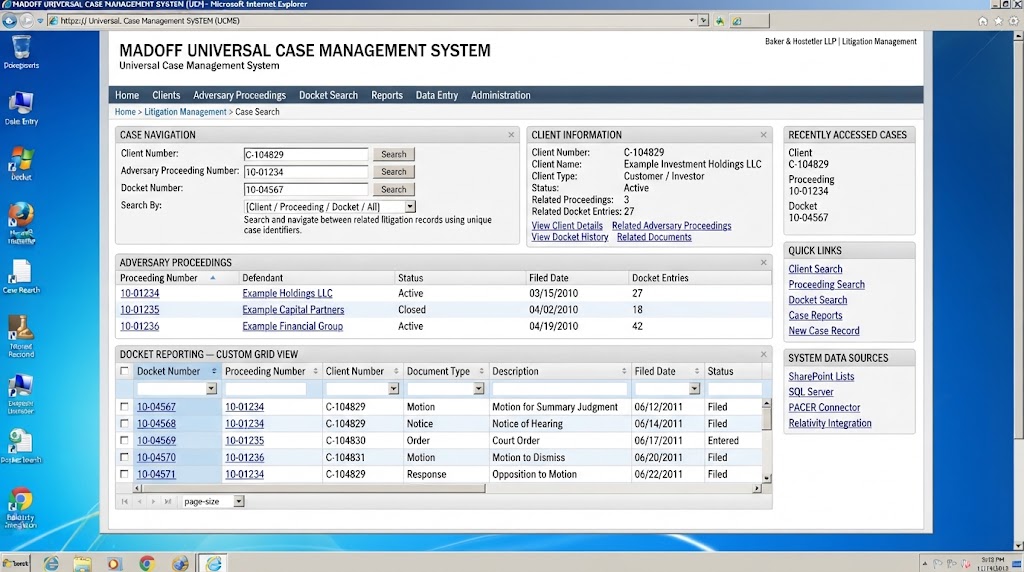
Built on Microsoft SharePoint Server and the .NET Framework, the system transformed a standard SharePoint intranet into a specialized legal case-management environment. It brought together case navigation, litigation data entry, reporting, and connections to external legal information systems through a collection of approximately 20 custom SharePoint field types and Web Parts.
The result was a configurable application framework that enabled attorneys and legal professionals to navigate interconnected client records, adversary proceedings, and court docket information from a common intranet environment.
The challenge
The Madoff litigation involved extensive and interconnected legal information. Attorneys needed to work across multiple identifiers and records, including:
- Client numbers
- Adversary proceeding numbers
- Court docket numbers
- Related case information and litigation records
- External court and document-management resources
These identifiers represented different ways of accessing related information. A client record could be associated with multiple adversary proceedings, each containing numerous docket entries and related documents.
A conventional SharePoint implementation would not provide the specialized navigation and reporting capabilities required for this environment without significant customization. The challenge was to create a flexible system that allowed legal professionals to locate related information, enter case data, and generate reports without navigating disconnected applications or relying on separate interfaces for every function.
The solution: a custom SharePoint application framework
The UCMS was developed by extending SharePoint Server through custom .NET components. Rather than building each application page as an independent solution, the architecture centered on reusable SharePoint field types and Web Parts that could be configured to serve different business functions — approximately 20 of them, collectively forming the foundation of the system.
1. Custom case navigation
A core capability was the ability to navigate litigation information through multiple identifiers. Custom field types and link-based navigation components enabled users to move between:
- Client numbers
- Adversary proceeding numbers
- Docket numbers
- Related case records and information
Custom link fields provided a consistent way to connect related records and expose navigation paths within the intranet, so attorneys could move from one area of a case to another without independently searching for each related record.
2. Configurable SharePoint Web Parts
A major architectural feature was the development of reusable, generically configurable Web Parts. Instead of creating a separate custom component for every reporting or navigation requirement, the Web Parts were designed to support different use cases through configuration. The same underlying component architecture could be adapted to provide:
- Case and record navigation
- SQL Server data retrieval
- SharePoint list reporting
- Data entry interfaces
- Custom record displays
- Configurable data grids
- Links between related litigation information
This approach established a common application framework within SharePoint, allowing new functionality to be assembled from reusable components rather than repeatedly developed from scratch.
3. SQL Server and SharePoint reporting
The UCMS included a custom reporting Web Part capable of retrieving and presenting information from both SQL Server databases and SharePoint lists, providing a consistent reporting interface across different underlying data sources.
A key component was the integration of the Telerik Grid control, which provided a structured, interactive way to display litigation information. The custom grid Web Part supported the presentation of case-related data in configurable views, allowing users to work with information through familiar tabular interfaces. The architecture made it possible to configure reporting components for different data requirements without building a completely separate reporting application for each one.
4. Integrated data entry and information management
The system also provided configurable data-entry capabilities. Custom field types and Web Parts allowed the intranet to support specialized litigation information rather than relying exclusively on standard SharePoint fields and forms.
The combination of data entry, reporting, and navigation created a more unified environment for managing case-related information.
5. External legal data and document-system integration
The UCMS operated within a broader legal technology environment that included connections to third-party data sources and litigation-support systems.
- PACER — Public Access to Court Electronic Records, providing access to federal court records and docket information.
- Relativity — a litigation-support and electronic discovery platform.
- Third-party data connectors — components used to connect external systems and data sources with the broader application environment.
These integrations helped bring internal case-management functionality together with external legal information and document-management resources.
Technical architecture
The solution used Microsoft's enterprise development platform, extended with custom application components and third-party integrations.
| Technology | Role in the solution |
|---|---|
| Microsoft SharePoint Server (on-premises) | Intranet application platform and Web Part hosting |
| Microsoft .NET Framework | Custom application logic and component development |
| Microsoft SQL Server | Structured data storage and reporting |
| Custom SharePoint field types | Specialized litigation data fields and navigation |
| Custom SharePoint Web Parts | Reusable navigation, reporting, and data-entry interfaces |
| Telerik Grid control | Interactive tabular reporting and data presentation |
| Third-party data connectors | External system and data integration |
| PACER | Federal court docket and legal information access |
| Relativity | Electronic discovery and litigation-support integration |
Business and operational impact
The UCMS was designed to address the practical information-management demands of complex litigation. Its value came from bringing several capabilities together in a common application environment.
Centralized navigation
Attorneys could navigate related litigation information through client, proceeding, and docket identifiers, providing a more direct path between interconnected records.
Consistent reporting
The configurable reporting framework allowed information from SQL Server and SharePoint lists to be presented through a common interface.
Reusable application components
The generic Web Part architecture reduced the need to develop individual interfaces for every new navigation, reporting, or data-entry requirement.
Improved access to case information
The integration of internal records and external legal information sources supported a more connected working environment for legal professionals.
Extensible enterprise architecture
By extending SharePoint rather than building an entirely separate application platform, the system leveraged an established enterprise intranet environment while introducing specialized legal application functionality.
The engineering behind the system
The most significant aspect of the UCMS was not simply its use of SharePoint. It was the application architecture built on top of it. Approximately 20 custom field types and Web Parts provided a reusable framework for transforming SharePoint into a specialized legal information system.
The components were designed to work together: navigation connected records, reporting presented information across multiple data sources, and configurable interfaces supported data entry and case management.
This required an understanding of enterprise application development, database integration, user workflows, and the underlying business processes of complex litigation.
Relevance to enterprise software development today
The engineering principles demonstrated by this project remain relevant to modern enterprise systems. Organizations frequently need to extend existing platforms, integrate disparate data sources, and provide consistent ways for employees to access information across complex business processes. The UCMS is an example of how a well-designed application framework can turn an existing enterprise platform into a specialized business solution.
Today, Gene Farber brings this experience to Expert Tech Pilot, helping Northeast Ohio organizations develop custom enterprise applications, modernize legacy systems, integrate business platforms, and build practical Microsoft-based solutions.